

Facebook has recently added new feature called Tag Suggestion. If you upload a new picture to Facebook, this feature starts recognizes the faces of your friends in that picture and automatically tags the uploaded picture. So you don’t need to tag manually. By default this feature is turned on for all the Facebook users. If you find this tag suggestion is disturbing, then you can disable it in your Facebook account. Here is steps.

How to Disable Auto Tag
1. Go to Facebook and login to your Facebook account.
2. Then go to Account → Privacy Settings link at from the top-right corner as shown.
3. On the Privacy Settings page, click on the Customize Settings link shown at the bottom left.
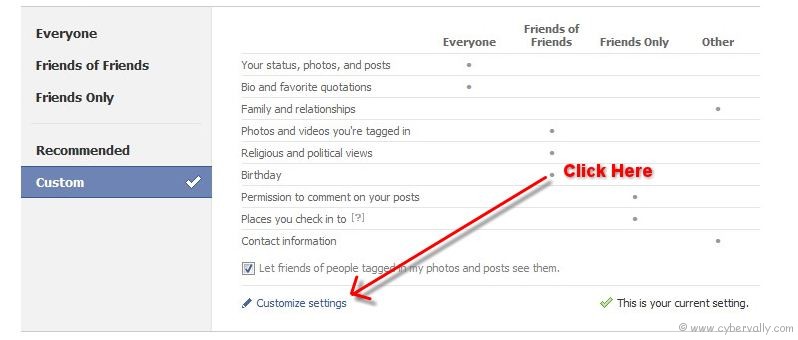
4. Then click on the Edit Settings button shown against Suggest photos of me to friends.

5. Select disable option and click Okay button to save the settings.

Yep! you done. Now no one can disturb you by using auto tag option.
If you’re a Facebook user and want to keep up on the latest Technology news why don’t you join the CyberVally Facebook page?
If you enjoyed reading this post, please consider leaving a comment below or subscribing to the feed


Ye ankhe uf umaaa… Thank god, you did not do with just eyes in LIKE box.. LOL…