

I took about 10 minutes for found out where is the shut down button for Windows 8.  Many people don’t know how to shut down Windows 8 in first time use. This is not easy to find out shut down button in Windows 8 because Windows 8  is optimized for touchscreen tablets and smart phones. Normally we will not turn off our smartphone every time.  When not in use we just lock our tablet or smartphone. Please go through below steps to find out how to shut down Windows 8. Hope Microsoft will fix this issue in its final version.
How to Shut Down Windows 8 – Solution 1
1. Press the Windows start key to get back to the Metro UI.
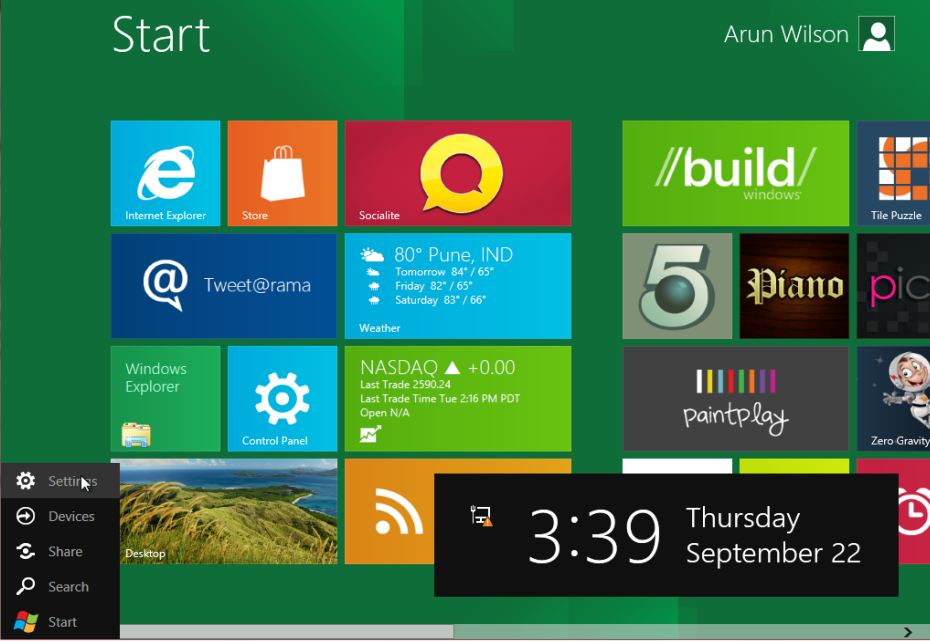
2. Move the cursor to the very edge of the screen, at the bottom-left corner, and the “Start menu†will appear.
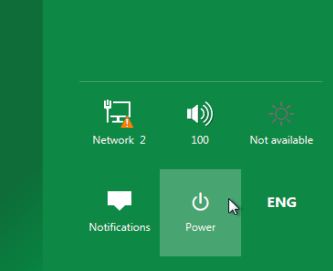
3. Click Settings , a sidebar will appear on the right-hand side of the screen. Click Power, and then click Shut Down from the popup menu which appears.
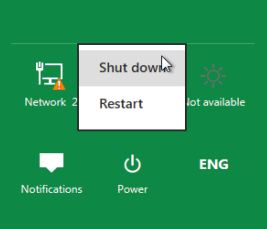
How to Shut Down Windows 8 – Solution 2
Also you can shut down using Switch to  Desktop Mode in Windows 8 . Press the  Alt + F4 keys simultaneously to bring up an Shut Down . Select the appropriate option from the drop down menu.
You can follow us on Twitter or join our Facebook fan page to keep yourself updated on all the latest from Microsoft, Google and Apple.


Thanks!