


Now there is a speed war going on the web. Many browsers compete on speed, security, standards support and features.After HTML 5 released all of major browsers upgrading up support for HTML5 and its associated technologies. The latest technology available in browser is hardware acceleration. In this hardware acceleration browser hands off processor intensive tasks to the computer’s GPU to improve animations and page rendering faster and smoother. Hardware acceleration seems to be a “secretive” area that’s not covered very much in detail by any vendors.
Disable Hardware Acceleration in Firefox 4
– Open Firefox Browser
– Go to Firefox -> Options -> Options
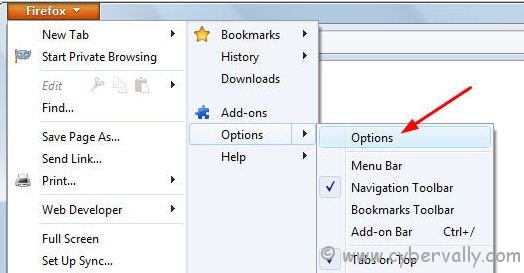
– In options window select Advanced -> General. Disable Check box labeled Use Hardware acceleration when available.
– Click OK to save changes.
Disable Hardware Acceleration in IE9
– Run IE9 web Browser.
– Go to Tools -> Internet Options.
– In that window browse to the “Advanced†tab and disable “Use Software rendering instead of GPU renderingâ€
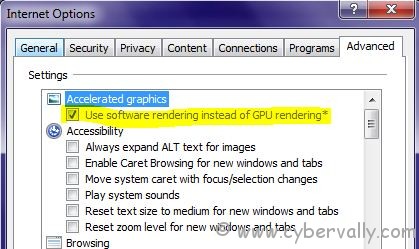
– Click OK to save settings.
Disable Hardware Acceleration Google Chrome 10
– Open Google Chrome Browser
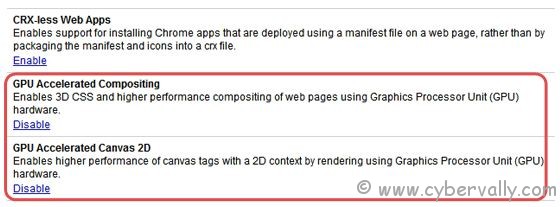
– Type this on Address bar ” about:flags “
– Disable The following things 1) GPU Accelerated Composting 2) GPU Accelerated Canvas 2D
If you’re a Facebook user and want to keep up on the latest Technology news why don’t you join the CyberVally Facebook page?
If you enjoyed reading this post, please consider leaving a comment below or subscribing to the feed


ആരàµâ€à´•àµà´•àµ†à´™àµà´•à´¿à´²àµà´‚ ഉപകാരമàµà´³àµà´³ à´Žà´¨àµà´¤àµ‡à´²àµà´‚ പോസàµà´±àµà´±àµ ചെയàµà´¤àµ കൂടെ?
വിഷയ ദാരിദàµà´°àµà´¯à´‚…. 😛